Pipe Trades Pro Calculator
- 4.8
- Rating
- 50.00K
- Installs
- Free
- Price
 Analysis by App-foxy
When I look at a trade calculator, I am not asking for a long list of formulas. I want something that helps me make a sound decision while I am standing beside a pipe, checking a drawing, or trying to avoid redoing a cut. Pipe Trades Pro Calculator is built around that practical need. It is a free tools app from Calculated Industries, aimed at pipefitting and related field work rather than general household arithmetic.
The capability that matters most to me is its handling of rolling offsets. That is the kind of calculation that can turn a quick installation into a slow exercise in remembering formulas, checking angles, and converting dimensions. Having a dedicated calculator means I can focus on the layout instead of reconstructing the mathematics from memory. The app also covers pipe fitting and weld math, so the rolling-offset workflow sits inside a broader trade-specific toolkit.
My overall impression is that this is a focused utility, not a general calculator with a few construction labels added afterward. Its purpose is clear: reduce the mental work involved in field calculations. That makes it especially interesting for working pipefitters, welders, fabricators, apprentices, and anyone learning how spatial offsets are calculated.
You May Also Like

 Pandora - Music & Podcasts
Pandora’s Music Is Easy to Start, but Harder to Recover
Pandora’s strength is its low-effort path from a seed to a station. Its weak spot is how much confidence it asks you to place in connection, setup, and quiet recovery.

 8 Ball Pool
 Is Built on Rivalries, Rematches, and Routine
A close look at the rivalries, rematches, shared routines, and unanswered safety questions that turn a quick pool match into a persistent mobile community.

 Samsung Music
’s Quiet Strength Is Playing What You Already Own
Its reach comes less from spectacle than from dependable access to a personal library. That simplicity is both the app’s strongest retention engine and its ceiling.

 AccuWeather: Weather Radar
AccuWeather Review: A Quick, Clear Forecast for Everyday Decisions
For everyday plans, the best forecast is the one you can understand quickly. AccuWeather makes rain timing, radar, and local conditions easy to act on, with a few trade-offs.

 Hill Climb Racing
Why Hill Climb Racing Still Turns Crashes Into One More Run
A tiny car, a bumpy hill and one more upgrade: Hill Climb Racing keeps resurfacing because its simple chaos makes every near-miss feel personal.

 AliExpress - Shopping App
AliExpress Makes Global Shopping Feel Personal, but Shoppers Bear the Risk
AliExpress turns a global marketplace into a pocket-sized discovery engine. Its reach is useful, its shopping loop compelling, and its trade-offs easy to miss.
More From Our News Desk
View All News


Rolling offsets are where the app earns its place
I find rolling offsets most useful when the measurements are clear but the geometry is awkward to hold in my head. This section looks at how a trade-focused calculation can reduce formula juggling while still leaving measurement and layout judgment in my hands. A quick check of the inputs remains essential, especially before cutting material.
A difficult calculation becomes a guided field task
A rolling offset is difficult because the pipe does not move in only one direction. The layout combines changes across more than one plane, so a mistake in one measurement can affect the final travel, fitting angle, or cut preparation. On paper, the calculation may be manageable, but on a busy job site it is easy to mix up the rise, set, travel, or diagonal relationship.
What I appreciate about a dedicated tool is that it frames the problem in trade language. Instead of opening a blank calculator and deciding which formula applies, I can work from the type of fitting task in front of me. That distinction is important. The app is not merely saving keystrokes; it is helping me choose a calculation path that matches the physical job.
The practical effect is strongest when measurements are already available and I need an answer quickly. I can enter the relevant dimensions, review the resulting calculation, and use it as part of the layout process. That is much more useful than searching through a general reference page while wearing gloves or moving between tools.
Why this matters beyond speed
Speed is helpful, but accuracy is the bigger reason to use this kind of app. A wrong rolling-offset calculation can lead to a poor fit, wasted material, or a correction that takes longer than the original installation. A dedicated calculator cannot verify whether I measured the job correctly, but it can reduce the chance that I select the wrong mathematical relationship or make a basic arithmetic slip.
This is also useful for learning. An apprentice can compare the app’s result with a hand calculation and identify where the two differ. I would not use that as a substitute for understanding the geometry, but it can be a practical second check. The best habit is to calculate independently when the work is critical, then use the app to confirm the result rather than blindly trusting any screen.
The real advantage is not that the app replaces trade knowledge; it keeps trade knowledge from being slowed down by repetitive arithmetic.
What I would prepare before opening it
The app works best when I approach it with the field information organized. Before entering anything, I would identify exactly what the drawing or installation is asking for, separate the dimensions by direction, and confirm that I am using the same units throughout. If the measurement itself is uncertain, a fast calculation only produces a fast version of an uncertain answer.
That preparation is one of the less obvious parts of using Pipe Trades Pro Calculator well. The app can make the calculation stage cleaner, but it does not remove the need to understand the fitting, the reference points, or the orientation of the pipe. I would also write down the result before moving on when the phone may be exposed to dust, water, vibration, or a crowded work area.
How the workflow feels in practical use
In practical use, the best routine is to identify the offset, organize the dimensions, enter them consistently, and compare the result with the drawing or physical route. I would practice that sequence with a familiar example before relying on it under job-site pressure. The next section weighs that focused workflow against the situations where a simpler tool may be more convenient.
From layout question to usable result
I see the most sensible workflow as a short sequence. First, I identify the offset situation and collect the measurements. Next, I choose the relevant pipe-fitting calculation rather than treating the task as ordinary multiplication and division. Then I enter the values carefully, check the displayed result against the physical layout, and use the answer to guide the next step.
That sounds simple, but the distinction between a calculation and a complete field decision matters. For example, if the pipe route changes direction and elevation at the same time, I still need to know which points define the offset. The application can process the numbers, while I remain responsible for selecting the correct points and interpreting the result.
For a first-time user, I would recommend practicing with a known example before relying on it during an installation. This makes it easier to understand how the app expects the problem to be described. It also reveals whether the terminology matches the way the user was taught. Trade language can vary between workplaces, and a calculator is only comfortable when its labels make sense to the person entering the measurements.
A realistic job-site example
Imagine I am fitting a pipe run that must clear an obstruction while also moving sideways to meet the next connection. I have the rise and the lateral change from the layout, but I do not want to estimate the travel or fitting arrangement from memory. Instead of writing several intermediate steps on a scrap of cardboard, I open the app, select the rolling-offset calculation, and enter the measurements in a controlled order.
The result gives me a mathematical reference for the next part of the job. I can compare that reference with the available pipe, the intended route, and the fitting choice. If the answer looks inconsistent with the drawing, that is a signal to stop and check the inputs or the selected calculation rather than immediately cutting material.
This is where the app feels more valuable than a standard phone calculator. A standard calculator can perform the arithmetic, but it leaves me to remember the formula and decide how the dimensions relate. Pipe Trades Pro Calculator is designed around the relationship between the numbers and the pipe task, which reduces the amount of mental translation required.
Useful habits for avoiding input mistakes
I would keep the measurement order consistent every time. If I enter the rise first in one job and the lateral dimension first in another, I increase the chance of confusing my notes. A repeatable routine makes the app easier to use under pressure. I would also pause after entering each value instead of rushing through the fields simply because the calculation itself is familiar.
Another useful habit is to check the result against the scale of the job. If the calculated travel appears unreasonable compared with the visible offset, I would inspect the inputs, units, and reference points. This kind of sanity check is especially important when switching between drawings, field measurements, and dimensions supplied by another person.
The app should be treated as a calculation aid, not as a measuring instrument or an automatic layout inspector. That trade-off is easy to overlook because a specialist interface can feel authoritative. My recommendation is to use it as one part of a reliable process that includes measurement, interpretation, calculation, and physical verification.
Where the broader tools fit
Although rolling offsets are the strongest reason to install it, the app also addresses pipe-fitting and weld mathematics. That makes it more useful than a single-purpose offset calculator for someone who regularly moves between related tasks. I can imagine keeping it available during fabrication, fit-up preparation, and study sessions where several types of trade math appear close together.
At the same time, I would not describe it as a complete replacement for drawings, code references, manufacturer instructions, or an experienced supervisor. Those resources answer questions that a calculator cannot. The app helps with numerical work; it does not decide whether a particular installation is acceptable, whether a fitting is appropriate for the system, or whether the physical conditions match the assumptions behind the calculation.
Where it performs best and where it may disappoint
A specialist calculator earns its space when pipe-fitting or weld math comes up regularly, but its focus can feel like extra complexity for someone who only needs ordinary arithmetic. I also treat any calculated answer as conditional on the measurements and assumptions entered, not as an automatic check of the installation. That balance helps clarify who will actually benefit from keeping it available.
The best scenario is repeated field calculation
The strongest use case is a person who encounters pipe geometry often enough that a general calculator becomes inconvenient. If I am repeatedly solving offsets, checking fitting relationships, or handling weld math, the dedicated structure saves time and lowers the friction between seeing a problem and calculating it.
It is also a good fit for training. Students can use it after working through the underlying method, while instructors can encourage them to compare digital results with manual solutions. The app is particularly helpful when the goal is to understand how a change in one dimension affects the rest of the layout. That makes it more than a shortcut, provided the learner does not skip the reasoning entirely.
For occasional home users, the value is less certain. Someone who needs one pipe measurement for a small repair may find a regular calculator or a trusted reference more approachable. The specialized terminology can create more work than it saves when the user does not already understand pipe-fitting concepts.
The main trade-off is specialization
Specialization is both the app’s strength and its limitation. A general calculator is flexible and familiar, but it does not guide me through trade-specific problems. This app is more relevant when the problem is a pipe-trade calculation, yet it is less useful for unrelated arithmetic, project budgeting, inventory, scheduling, or drawing management.
I would also expect a learning curve if I were new to rolling offsets. A field-oriented calculator can be efficient for an experienced user while feeling dense to someone who has never been shown the underlying geometry. The answer is not to avoid the app, but to learn the terminology first and use simple examples until the input flow becomes natural.
Another limitation is the dependence on careful data entry. A dedicated calculator may reduce formula errors, but it cannot detect every incorrect assumption. Entering the wrong dimension in the right field can still produce a neat-looking answer. That is why I would keep the original sketch beside me and verify the output visually before committing to a cut or fit-up.
Free to install, but not necessarily cost-free in every use
Pipe Trades Pro Calculator is free to download, which makes it easy to test without an upfront purchase. The app includes in-app purchases ranging from under a dollar to just under forty dollars per item, so I would pay attention to what is available in the version I choose and whether any particular calculation or expanded capability requires payment.
That pricing structure does not automatically make the app poor value. For a professional who avoids even one wasted piece of material or one unnecessary correction, a useful trade calculator can justify a modest expense. Still, casual users should not assume that every part of the experience has the same cost simply because the initial installation is free.
Device compatibility and age considerations
The app requires Android version 7.0 or later. That covers many devices, but anyone using an older phone should check compatibility before planning around it. The current version is 10.8.1, which indicates that the application has continued to receive version updates over time, while its original release was on May 24, 2012.
Its Everyone content rating also makes it broadly suitable from an age-rating perspective. That does not mean every young user will understand the calculations, of course. The practical barrier is trade knowledge, not mature content. I would introduce it to a learner alongside instruction on pipe geometry and safe work practices rather than handing over the calculator without context.
Who gets the most from this calculator
Pipefitters, welders, fabricators, and apprentices are the natural audience, particularly when they can use the calculator alongside drawings, sound measurement habits, and an understanding of the geometry. For occasional household work, a general calculator or a trusted reference may be easier; for critical decisions, professional guidance and physical verification remain important. The final section considers how device and network circumstances fit into that choice.
Experienced pipefitters and welders
Professionals gain the most when they already know what they are trying to calculate. The app can shorten the arithmetic stage without forcing them to reconstruct formulas from memory. It is especially useful as a pocket reference during work that involves several offsets or frequent changes between fitting and weld calculations.
I would still use it as a confirmation tool on critical work. Experienced users are often the best at spotting a result that does not match the physical situation, and that judgment remains essential. The app supports that judgment; it does not replace it.
Apprentices and students
For apprentices, the strongest approach is to use the app in two passes. First, solve the problem manually or explain the geometry in words. Then enter the same values and compare the result. If the answers differ, investigate the reason instead of choosing whichever number looks more convenient.
This approach turns the app into a learning aid rather than a black box. It can help build confidence with rolling offsets, but only if the user understands why the result changes when the measurements change. I would recommend keeping a notebook of worked examples, especially for problems that initially caused confusion.
Who should choose something else
I would steer a casual user toward a simpler tool if the need is only basic arithmetic or a one-time household repair. The specialist focus may feel unnecessarily complicated in that situation. I would also choose another resource when the main need is drawing interpretation, code compliance, project documentation, or measurement capture, because those tasks go beyond what a calculation app is meant to do.
Someone who dislikes entering measurements on a phone may prefer a physical trade calculator or a printed reference. A phone can be awkward in dirty or wet conditions, and a digital tool depends on the device being available and usable. The app is most convincing when its speed and trade-specific guidance outweigh those practical inconveniences.
My final recommendation
After considering how I would use it, I see Pipe Trades Pro Calculator as a focused companion for people who regularly deal with pipe geometry. Its 4.8 average from around 1.6 thousand ratings and more than 50 thousand installs suggest that it has found a real audience among users looking for this kind of specialist tool. Those figures are encouraging, but the more important question is whether rolling offsets and related pipe math are part of your normal work.
If they are, I would recommend trying it, practicing with familiar examples, and building it into a careful measurement-and-verification routine. The app’s strongest benefit is not flashy presentation; it is the reduction of repetitive calculation during a task where mistakes can be expensive. If you only need a general calculator, it will probably feel too specialized. If you work with pipe fitting, welding, or trade training, it can earn a permanent place in your toolbox.
My honest view is that the app is most valuable when used with professional judgment. Check the dimensions, understand the geometry, review the result, and then confirm the physical fit. Used that way, this free tools app from Calculated Industries does exactly what I want from a field calculator: it makes a difficult calculation more manageable without pretending that the screen can replace the person doing the work.
FAQs for Pipe Trades Pro Calculator
01What is Pipe Trades Pro Calculator used for?
Pipe Trades Pro Calculator is designed to help plumbers, pipefitters, welders, fabricators, and students perform common trade-related calculations more quickly. It can assist with pipe geometry, offsets, rolling offsets, angles, elbows, takeouts, and other layout problems. It is intended as a practical field reference, although users should still verify results against project drawings, manufacturer specifications, and applicable codes.
02Is Pipe Trades Pro Calculator suitable for beginners and students?
Yes, the app can be useful for beginners, apprentices, and students because it brings several pipe-trade formulas and calculation tools together in one place. However, it is not a complete replacement for learning the underlying methods. New users should understand what each input represents, check the diagrams carefully, and compare the result with classroom examples or guidance from an experienced tradesperson before using it on a real installation.
03What types of calculations can I perform with the app?
The available tools focus on practical pipe-trade layout and fabrication tasks, such as determining dimensions for offsets, calculating angles and travel, working with pipe lengths, and solving common fitting or geometry problems. The exact options may depend on the version and platform. Because different jobs use different conventions, always confirm whether the calculator expects center-to-center, face-to-face, tangent, or fitting-specific measurements.
04Can I rely on Pipe Trades Pro Calculator for professional construction work?
The app can be a convenient aid for professional work, especially when a quick calculation is needed in the field, but it should not be treated as the sole authority for safety-critical decisions. Incorrect units, misunderstood terminology, or inaccurate measurements can produce an unreliable result. Before cutting or installing material, review the calculation, confirm the inputs, and follow approved drawings, company procedures, local codes, and fitting manufacturer instructions.
05Does Pipe Trades Pro Calculator work offline, and is it available for Android or iOS?
A calculator app of this type is generally intended to provide its core functions without requiring a continuous internet connection, which makes it practical in workshops and job sites with limited reception. Availability and offline behavior can vary by release, so check the current store listing before downloading. Also verify device compatibility, supported operating-system versions, pricing, advertising, and whether any advanced tools require an in-app purchase.
Pros
- Covers many pipe-trade calculations in one convenient app.
- Useful for quick field estimates without carrying reference books.
- Supports common fittings
- offsets
- angles
- and pipe layout problems.
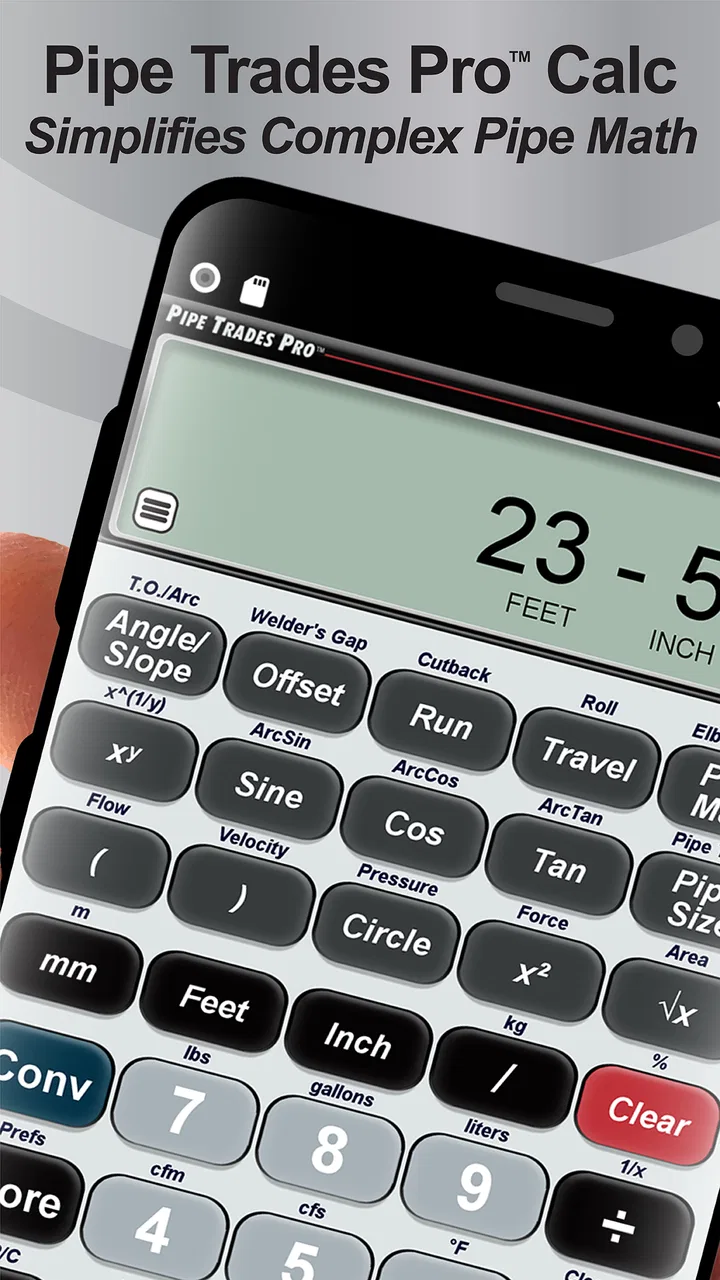
- Clear calculator-style interface makes most tools easy to access.
- Can help apprentices practice trade formulas and verify manual work.
Cons
- Some advanced features may require in-app purchases or a paid version.
- Results are only as reliable as the measurements and options entered.
- The interface may feel dated compared with newer calculator apps.
- Primarily useful to pipe trades professionals
- limiting general appeal.
- Users may need trade knowledge to interpret certain calculations correctly.

Pipe Trades Pro Calculator
Gallery